Gemini 3 Pro. Was the hype worth it?
My thoughts on Gemini 3 Pro after a week or two of real usage
After a week or two with Gemini 3 Pro, I can say it’s pretty good for UI work. We all saw a lot of hot takes on X and other socials about “dead Front End.” If you think front end is just styling, then you are terribly wrong. Most of these posts are just farming attentio, So let’s talk about real stuff
Is Gemini 3 Pro Revolutionary?
Kinda. It’s the first model that can regularly spit out very solid UI. Not perfect though. It still trips on hover states, bigger animation systems, Three.js bits, and true responsive layout.
But for a clean landing page or a dashboard shell, it’s honestly impressive. It gives you a usable start , a ground floor that you can fix later.
The catch is the same catch as always. You need a design or a reference. You need a very clear prompt. Structured. Specific. If you do that, then it’s magic. If you don’t, then you get AI page as always. The good news is that getting a good prompt isn’t hard anymore because you can use other models to help you write it.
UI Is Not the Whole Game
At some point, you want more than text, colors, and images. You want functionality. You want tools that behave. This is where the vibe difference shows up hard.
Theo posted a tweet describing the vibe difference between GPT 5.1 Codex and Gemini 3 Pro. Check it out yourself:
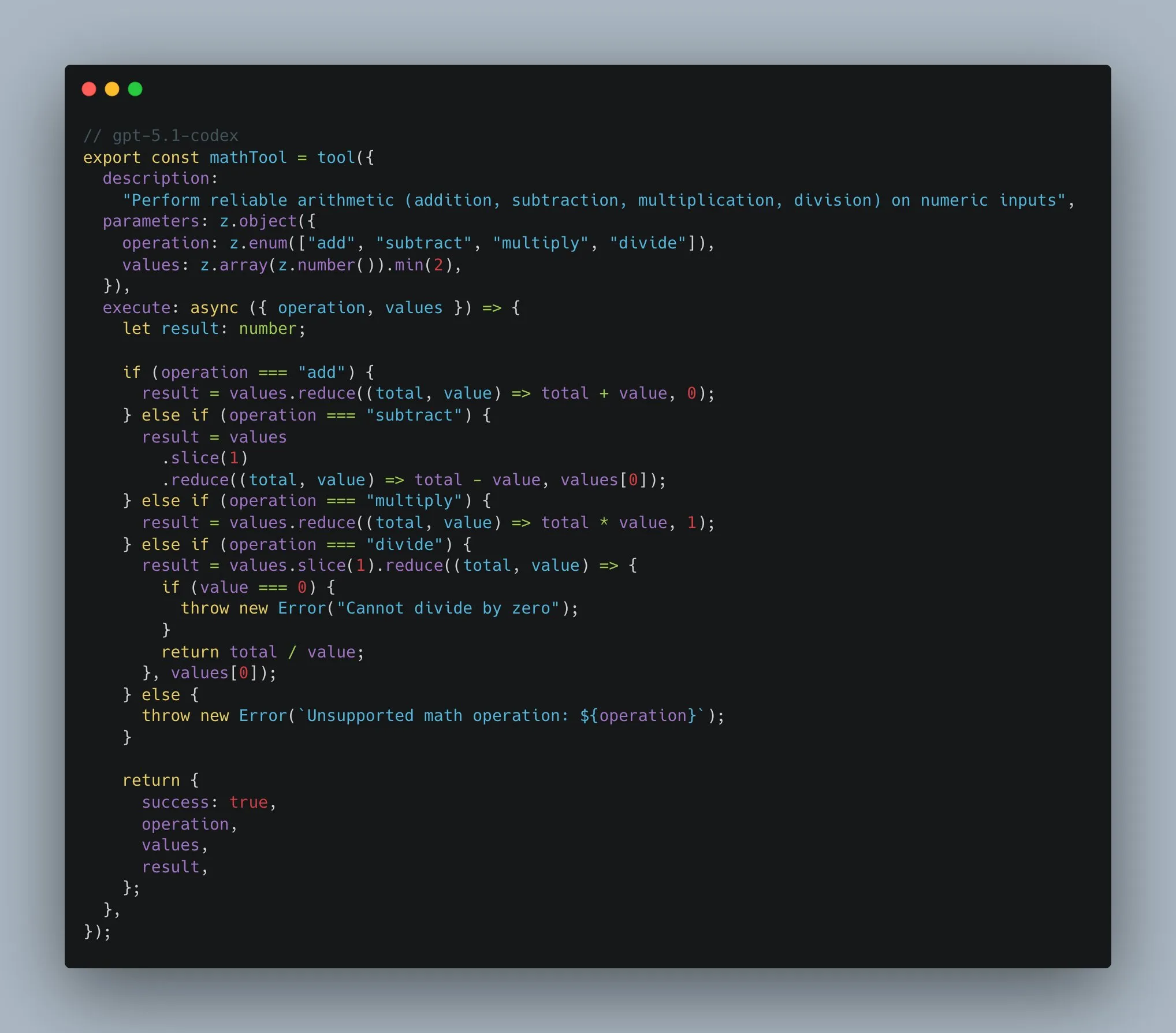
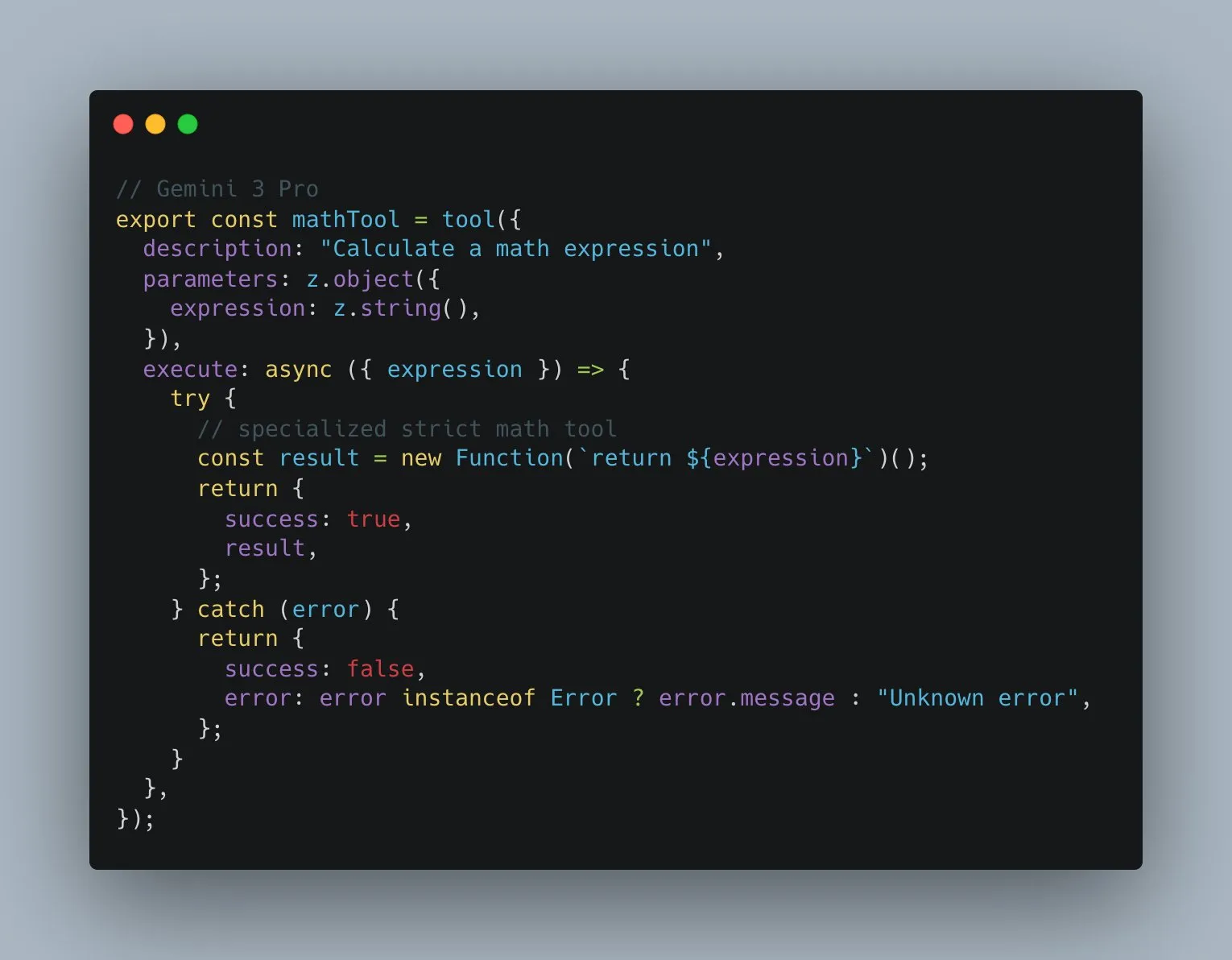
But if you don’t want to open the tweet, here are the code examples:
The Codex Approach
In the Codex snippet, the tool has actually decent code. It has a tight schema, it only accepts what it should accept, an operation enum, and a values array of numbers with a minimum length.
Then the execute block handles each operation explicitly: add, subtract, multiply, divide. It even checks for divide by zero and throws a real error. Nothing spooky. Nothing magical. Just a predictable tool you can trust.
The Gemini Approach
In the Gemini snippet, the tool looks fine on the surface but is basically a trap. It takes a single string called expression. Then it does this:
new Function(`return ${expression}`)()That means it’s not a math tool , it’s an eval disguised as one. Any string you pass gets executed as JavaScript. So instead of “calculate 2 + 2,” you’re really saying “run whatever code I typed.”
There’s no real validation. No guardrails. No guarantee the output is even numeric. It also opens the door for injection style bugs if this ever touches user input. Even in a toy demo, that’s a bad habit to encode.
It tells you a lot about how the model thinks. It reaches for a shortcut that works in a demo but fails the moment you care about safety or reliability.
Using It in Real Workflows
Price-wise, it’s good. Not very expensive , about twelve bucks for output, and you can use it everywhere. Well… almost everywhere.
Forget about Gemini 3 Pro in CLIs or random editor integrations: CLI agents, Cursor, Windsurf, Zed, and AI other VS Code forks.
The model just doesn’t feel the same there. I tried it. In Cursor, it was straight-up broken for me. Maybe they fixed it now, but even when it ran, it didn’t perform like it does in Google’s own setup.
Where it does work great is Antigravity (surprise) - Google’s VS Code fork. They added their own planning mode and it matches Gemini really well. You can feel the intended pairing
So, Was the Hype Worth It?
For UI generation and quick visual prototypes: Kinda yes but not the hype you saw on X for sure.
For dependable tool building and deeper coding: Not yet. It’s not a replacement for the models that can actually ship code
I’m still glad it exists. It pushes the space forward. And it’s a nice option to have in the stack. Just don’t fall for the idea that one model kills every workflow. Use it where it shines and move on.
Have a good one.